The built-in Tutor is aware of the lesson you are viewing–the videos, the problems, and the way the content is being taught, so you can ask for help when and where you need it. For example, you can ask for help to recall something you learned previously or define a term you don't know, understand the steps to tackle the current problem, check an answer before you submit it, or even ask the Tutor why you got a problem wrong.
Click the Tutor tab to access it.
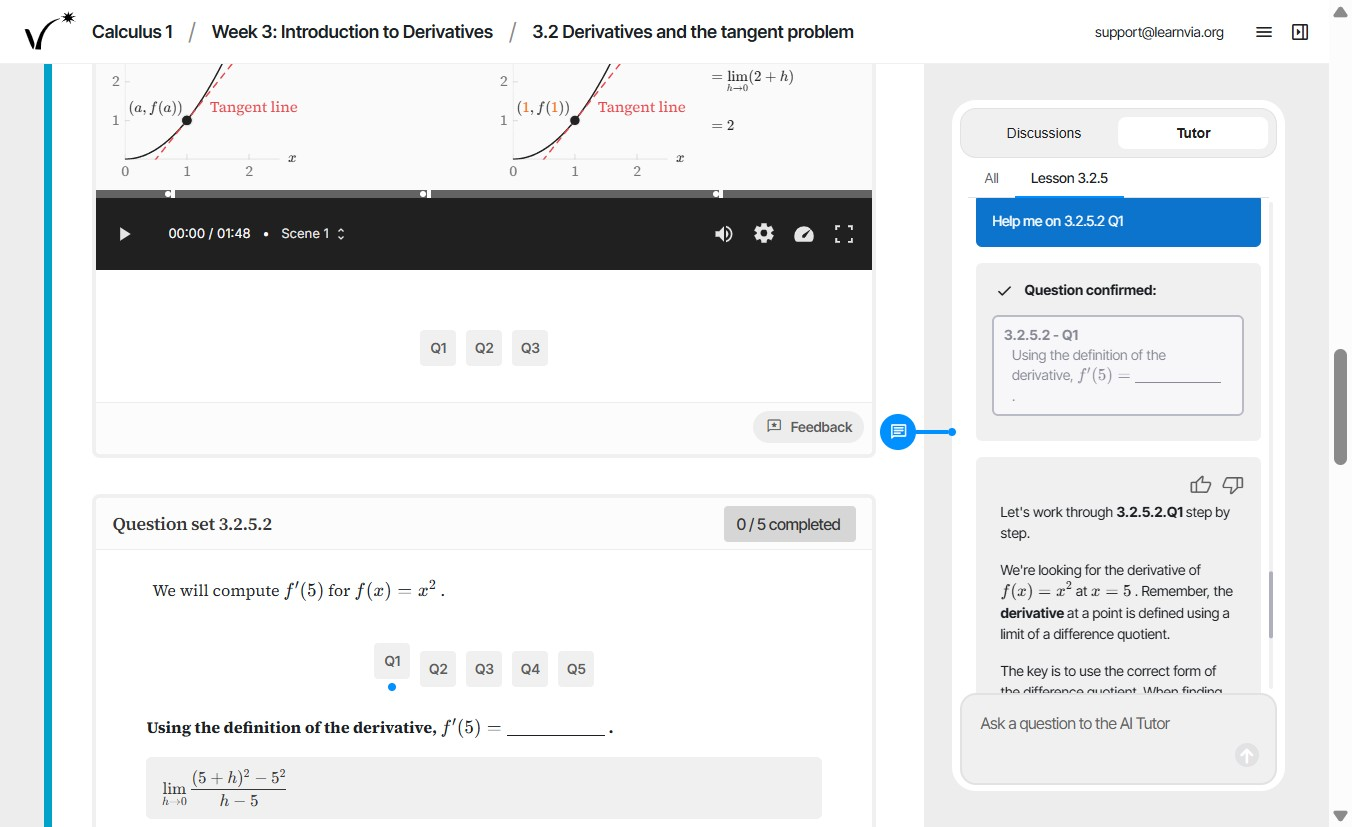
- Ask questions about the content such as "What is a difference quotient?"
- Ask general refresher questions such as "What is slope again?"
- Ask general questions about a video such as "What's this video about? Can you summarize?"
- Ask questions about specific elements of a video such as"On the right side of the video how did you get from lim 2 + h to 2?"
- Ask for help on a certain problem such as "Help me on 3.2.5.2 Q1".
It’s helpful to know that the Tutor has two modes:
- One mode is more conversational (like you would talk to a TA or a peer that is helping you with your homework). This mode is used in Lessons.
- One mode is designed to give you step-by-step guidance while solving problems. This mode is used in Homework sections. If you want to exit step-by-step mode, you can tell the Tutor you’d like to exit step-by-step mode and ask it for another type of help.
Was this article helpful?
That’s Great!
Thank you for your feedback
Sorry! We couldn't be helpful
Thank you for your feedback
Feedback sent
We appreciate your effort and will try to fix the article